


A STEP file is a 3D CAD model written in the neutral exchange format defined by ISO 10303. It usually arrives as .step or .stp, and it lets a part or assembly move between CAD, CAM and quoting systems that do not share a native format. To look at one, you need a STEP reader, not the CAD program that created it: open it in the STEP viewer, check the units and loaded bodies, and measure one dimension you already know.
The two extensions are the same format. Renaming .stp to .step changes nothing inside the file; the STEP vs STP guide covers the details.
What is inside a STEP file
Most STEP files you receive use the clear text encoding defined in ISO 10303-21, often called Part 21. The Library of Congress describes it as a plain text exchange structure for product data that follows an EXPRESS schema. STEP-file, ISO 10303-21. Because it is text, you can open a copy in any text editor and see what kind of file you have before you load the geometry.
A Part 21 file has a short, recognisable layout:
ISO-10303-21;
HEADER;
FILE_DESCRIPTION(...);
FILE_NAME('bracket.step','2026-09-30T10:12:00',...);
FILE_SCHEMA(('AUTOMOTIVE_DESIGN'));
ENDSEC;
DATA;
#10=CARTESIAN_POINT('',(0.,0.,0.));
...
ENDSEC;
END-ISO-10303-21;
- First line. A real Part 21 file starts with
ISO-10303-21;. If the first line is something else, the file was probably renamed from another format, and a STEP reader cannot fix that. - FILE_NAME. Usually records the original filename, a timestamp and often the exporting system. This is useful when you need to ask the sender for a newer export.
- FILE_SCHEMA. Names the application protocol the exporter wrote.
- DATA section. Numbered entity instances (
#10=...) that together describe the geometry, topology, product structure and any attributes the exporter included.
The schema name tells you which protocol to expect:
FILE_SCHEMA contains |
Application protocol |
|---|---|
CONFIG_CONTROL_DESIGN |
AP203 (first edition) |
AP203_CONFIGURATION_CONTROLLED_3D_DESIGN_OF_MECHANICAL_PARTS_AND_ASSEMBLIES_MIM_LF |
AP203 second edition |
AUTOMOTIVE_DESIGN |
AP214 |
AP242_MANAGED_MODEL_BASED_3D_ENGINEERING_MIM_LF |
AP242 |
For what each protocol can carry and which one to request, read AP203 vs AP214 vs AP242. Do not edit the header to change the protocol; the data section was written for the original schema.
What a STEP file can and cannot carry
The geometry in a typical mechanical STEP file is B-Rep: exact faces, edges and closed shells rather than a triangle mesh. That is why STEP can support precise dimensions, surface area and solid volume, where an STL can only approximate them. What B-Rep means.
Depending on the exporter and protocol, a STEP file can also include:
- assembly structure, component names and placements;
- colors and layers;
- in AP242 files from capable exporters, product manufacturing information such as dimensions and tolerances.
It normally does not contain the original feature tree, sketches or constraints. You receive the result of the design, not the steps that built it. If you need to edit history, ask for the native file. Related questions come up often enough to have their own guides:
- Why a STEP export has no feature tree
- Does a STEP file contain material?
- Does a STEP file contain tolerances?
- Does a STEP file contain a BOM?
- Why threads are missing from a STEP file
How to open a STEP file online
- Keep the original file untouched. Work from a copy if you plan to open it in a text editor.
- Open the STEP viewer in a browser with WebGL. This works the same way on Windows, macOS and Linux.
- Select the
.stepor.stpfile. The file is uploaded for server processing; viewing and measuring do not need an account. - When the model appears, use Fit to frame it. Fit only moves the camera; it does not rescale the model.
- In the Properties panel, check the solid count and compare the X, Y and Z extents with a value from the drawing or the sender.
- For an assembly, open Structure and check that every expected component is listed. Repeated instances are counted in totals, and overlapping parts are not subtracted.
- Only after scope and scale look right, use dimensions, area or volume.
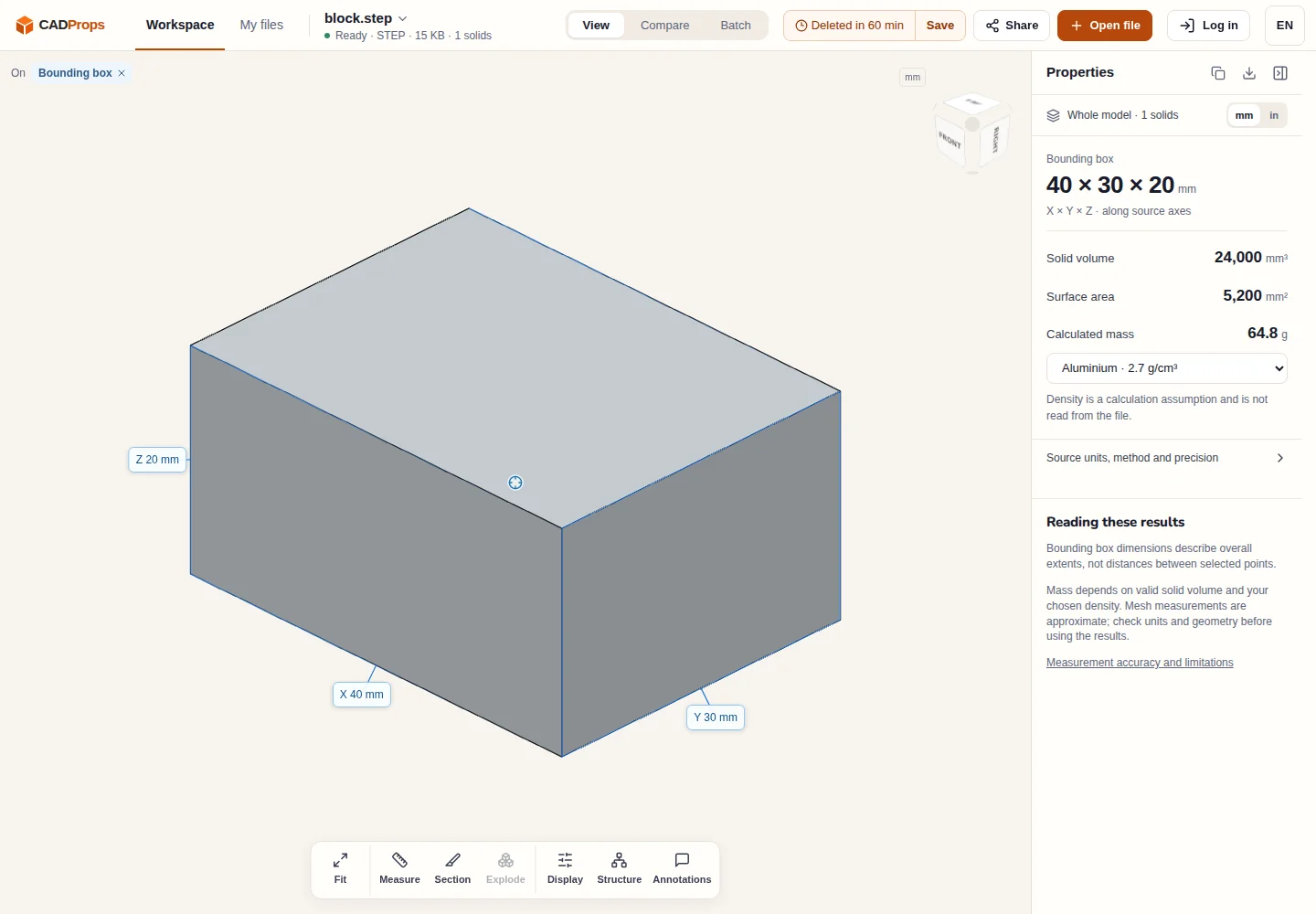
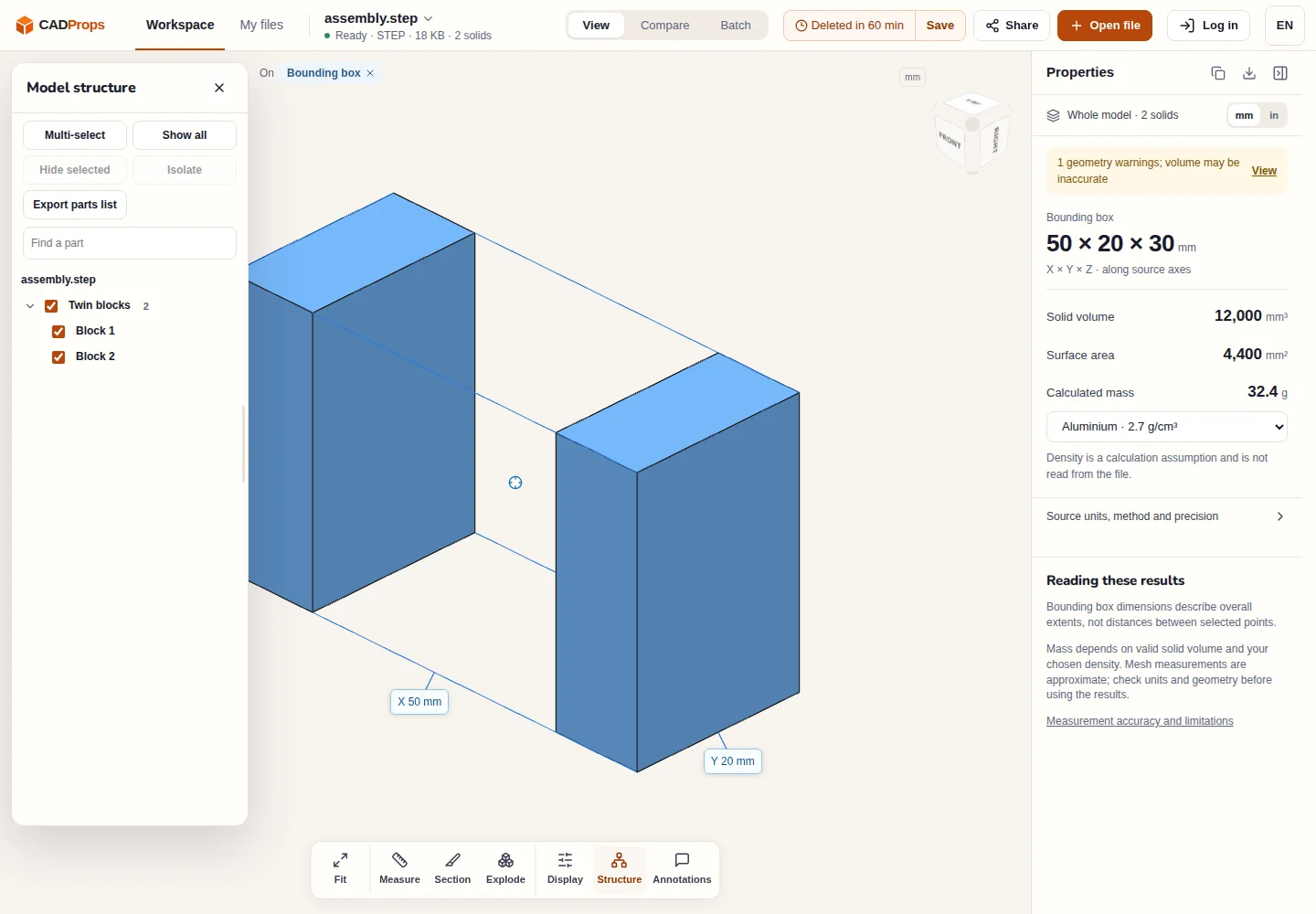
Solid volume is reliable only for valid closed solids. If it is unavailable or carries a geometry warning, the file may contain open or unsewn surfaces; the reason is explained in why STEP volume is zero or missing.
Other ways to open a STEP file
Most mechanical CAD systems import STEP, so if you already have one, importing is a normal route. Note that import may heal or reinterpret geometry, and the result belongs to that system from then on.
To examine the data rather than the shape, NIST publishes the STEP File Analyzer and Viewer, which reports entity types, product structure and conformance-related information. NIST STEP File Analyzer and Viewer. It is a good tool when you need to know exactly what the exporter wrote.
A browser viewer suits the common case in between: you received a file, you do not own the source CAD system, and you need to confirm what arrived and how big it is.
When a STEP file will not open or looks wrong
| Symptom | Likely cause | What to do |
|---|---|---|
| Reader rejects the file | First line is not ISO-10303-21;, or the file was renamed from another format |
Ask for a real STEP export |
| Assembly loads with missing parts | Assembly was exported as several files that reference each other | Ask for a single-file assembly export |
| Model is 25.4 times too large or small | Inch and millimetre assumptions disagree | Fix a 25.4 scale error |
| Volume unavailable | Open shells or surfaces, not closed solids | Check the representation before estimating mass |
| Threads, tolerances or material missing | Not exported, or exported as data the receiver ignores | Check the drawing and the guides above |
CADProps reads self-contained STEP files. It does not fetch external files that an assembly refers to.
Convert only after checking the original
If the next step needs a mesh, convert from the checked STEP file: STEP to STL for printing, or the other STEP conversion tools for OBJ, 3MF, glTF and GLB. Mesh output is an approximation and is not an editable CAD solid. Reopen the result and compare its dimensions with the source; the CAD conversion checklist lists the checks.
For a full measuring workflow after opening, continue with how to measure a STEP file online. All STEP tools and guides are collected on the STEP hub.
Original article: CADProps · https://www.cadprops.com/guides/step-file-what-it-is-how-to-open/