

A supplier sends bracket.stp. Your receiving software asks for a STEP file. That does not necessarily mean you have received the wrong format. STEP and STP are commonly used filename extensions for STEP exchange data; the three-letter spelling is not a lower-quality version. NIST lists both extensions in its STEP file description.
Open the matching tool. Viewing is available without an account; sign in when the conversion workflow requires it.
Check the same file rather than converting its name
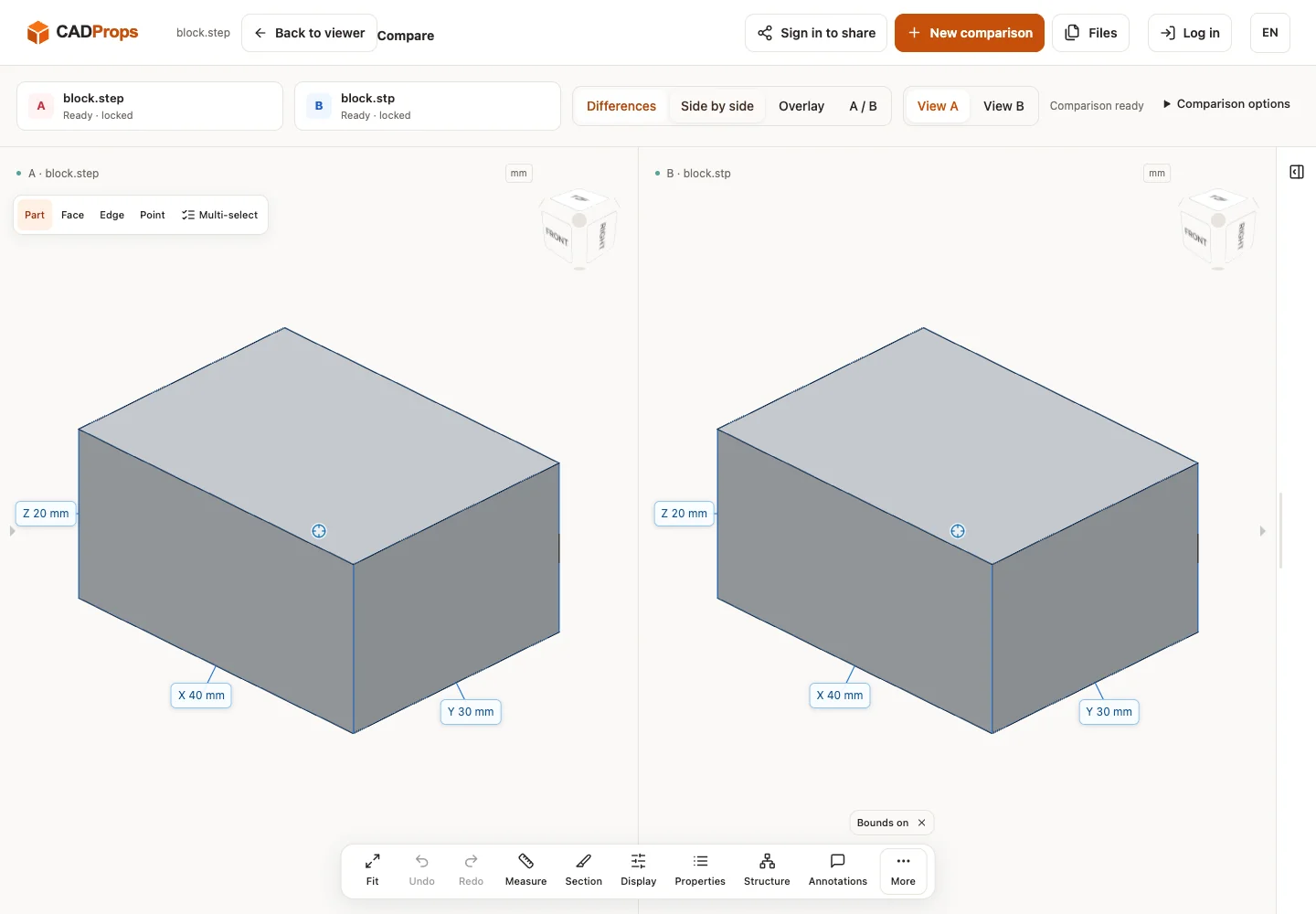
STEP and STP are alternative extensions for the same exchange format. To reproduce this safely, keep the original public block.step, create a byte-identical copy named block.stp, and open both in the STEP viewer. The bytes and expected 40 × 30 × 20 mm geometry are the same. Renaming STL, IPT or SLDPRT to STEP does not change its representation. If an application rejects one extension, first check its file picker and supported STEP protocol instead of assuming the geometry differs.
The practical answer
Try opening the original file with a reader that accepts STEP. A file picker may show only one spelling even though the reader accepts both. Choosing “all files,” where appropriate, is different from changing the data.
Renaming bracket.stp to bracket.step changes the name, not the geometry. It does not add missing components, repair a broken surface, upgrade an application protocol or recover a native feature tree. Keep an untouched copy before renaming anything for a downstream naming rule.
| Change | What it actually does |
|---|---|
.stp to .step by renaming |
Changes the filename only |
| SolidWorks file to STEP with a compatible exporter | Translates supported source data |
| STEP to STL | Produces a mesh representation using export settings |
| ZIP containing STEP to an extracted file | Removes an archive wrapper; not a CAD conversion |
What to check instead of the extension length
Check the source of the export, its intended configuration, its units and the expected bodies or components. STEP can carry different kinds of product information, and a particular export may include only part of what its sender sees in the native application. NIST describes geometry, assemblies and product manufacturing information in its analyzer documentation; that does not mean every file contains all of them.
The application protocol is a separate matter. Asking whether an export is AP203, AP214 or AP242 is more informative than asking whether its extension has three or four letters. Even then, the sender's export options and the recipient's reader determine what arrives. See the STEP application-protocol guide.
When changing the extension will not help
A truncated download, an HTML error response saved with a CAD extension, a missing external reference and an unsupported representation all require different remedies. A renamed file can still be incomplete or unreadable. Ask for a fresh export or the original package when the actual content is the problem.
Do not diagnose a file only from an icon shown by the operating system. File associations tell the operating system which application to launch; they do not validate the CAD data. Likewise, a web upload accepting a filename is not proof that a reader has successfully opened it.
Send an unambiguous handoff
Include the part identifier, revision or issue label, expected units, export source and any companion drawing. A short note such as “millimeters, one solid, mounting bracket Rev.B” is more useful than changing STP to STEP and assuming the recipient now has enough context.
Open the STEP viewer interface for the inspection workflow. Samples and uploaded files use the same server processing pipeline. Selecting a file immediately uploads it into a private, temporary guest workspace. Use the actual downstream application to verify a production deliverable.
Common questions
Is STP compressed STEP? Not merely because it has three letters. Compression is a separate packaging choice; check the actual container and reader support.
Does changing STP to STEP improve accuracy? No. Renaming does not change any coordinates, topology or stored representation.
Should I make both copies for a supplier? Usually send the naming convention the recipient requests and keep a clear original. Two differently named copies of identical bytes can create unnecessary confusion about which one is the current issue.
Distinguish a file-picker issue from a reader failure
If an application lists .step but hides .stp, check whether an “all files” selection or the agreed naming convention resolves the picker restriction. Preserve the original, and if renaming a genuine STEP copy is required, verify that only the name changed. A checksum comparison can establish identical bytes; it cannot validate the engineering contents of unrelated files.
If the reader accepts the filename and then rejects the data, investigate the actual STEP content, supported protocol/representation and whether the transfer was complete. An HTML download-error page named .stp is not STEP. A valid STEP with an open shell is also a different problem from a picker filter.
Ask the sender for the source revision, export application and expected geometry scope. When a fresh export resolves a failure, record it as a new derivative of that source rather than claiming that changing three letters to four improved geometry accuracy. Keep one authoritative deliverable in the receiving package to avoid duplicate-copy revision confusion.
Reproduce the observed result
We opened block.step and a byte-identical block.stp copy in the same local workspace. Both displayed 40 × 30 × 20 mm. The computed solid comparison found A-only 0 mm³, B-only 0 mm³ and common 24000 mm³ at 0.001 mm Boolean tolerance, in original coordinates. The same checksum proves identical input bytes; this single pair does not establish that unrelated STEP files are equivalent.
Download original sample · block.stp · Verification record
Open the matching tool. Viewing is available without an account; sign in when the conversion workflow requires it.
Original article: CADProps · https://www.cadprops.com/guides/step-vs-stp-file-extension/