

 View without an account
 Temporary workspace
Open a SolidWorks SLDPRT part in the browser, or upload a ZIP containing an SLDASM assembly and its referenced parts. Inspect converted geometry, verify dimensions and keep incomplete assembly scope visible.
Open SLDPRT parts without SolidWorks
Upload a supported SLDPRT file and inspect the converted geometry in a temporary guest workspace. Rotate, fit and check one known dimension before relying on downstream properties. A viewable model is useful for review, but it does not recreate the SolidWorks feature tree or configuration logic.
SLDPRT viewer online: what to expect
If you searched for an SLDPRT viewer or a SolidWorks viewer online, this is a browser viewer for inspection: orbit, fit, section and measure a part, and read its properties. It does not need SolidWorks, eDrawings or an account for viewing. It is not an editor; the feature tree, sketches and mates are not available. Reading depends on the SolidWorks save version, so a file from a newer release may not open (see the section on version compatibility below, and opening an SLDPRT without SolidWorks).
Which SolidWorks file to open
- SLDPRT: a single part; upload it directly.
- SLDASM: an assembly that references other files; upload a ZIP with the assembly and its parts. See missing parts in an SLDASM.
- SLDDRW: a drawing; only the saved preview image is shown (details below).
When the next step is a neutral file for another system, use the SolidWorks to STEP converter after you have checked the model here.
Package SLDASM assemblies with referenced files
A SolidWorks assembly can depend on SLDPRT parts and nested SLDASM files. Preserve relative folders inside a ZIP and include the intended top-level assembly. Missing references produce an incomplete result rather than a silent complete-looking total. In SolidWorks, Pack and Go copies the assembly and its referenced files into one folder; zip that folder and upload the ZIP.
Check dimensions and loaded scope
Use overall dimensions and supported geometry measurements to sanity-check the result. For partial assemblies, volume, surface area and density-based mass describe only loaded components. Keep the source revision and component completeness with any reported value.
Measure volume and mass of a SolidWorks part
Open the SLDPRT and read volume and surface area in the properties panel. When the part's Parasolid body is read exactly, these values come from the solid; when the result is marked approximate, they come from the saved display triangles and are estimates. Mass is volume multiplied by the density you choose. CADProps does not take the material from the SolidWorks file, so pick the density of the material on the drawing, and switch between millimetres and inches to compare with it.
Parts with several configurations
CADProps reads the configuration that was active when the part was last saved. If the shape on screen is not the variant you were asked about, ask the sender to activate that configuration and save the part again, or to export that configuration as STEP.
Know when a neutral STEP handoff is better
If the next system does not use SolidWorks, convert the supported source to STEP after inspection. Verify units, expected bodies/components and critical geometry in the resulting STEP. Neutral conversion does not preserve native sketches, mates or feature history.
Treat version compatibility as a real boundary
SolidWorks save versions and native-file details vary. If an SLDPRT or SLDASM fails, keep the original unchanged and confirm the source release, dependencies and intended configuration before assuming corruption.
Exact and approximate results
SLDPRT parts give exact properties and exact STEP only when their Parasolid body is rebuilt into a closed, valid solid; when the file has a saved display, the solid is rejected if its bounding box clearly disagrees with it. For a part saved without a display, the configuration shown cannot be verified. SLDASM assemblies are shown from saved display geometry with approximate properties and export as mesh STEP. Files saved without display geometry that cannot be rebuilt this way show an approximate rebuilt preview or their saved thumbnail.
SLDDRW drawings: preview the saved image
A .slddrw contains a drawing rather than the part geometry used by the SLDPRT workflow. CADProps shows only the preview image saved in the file. It does not read drawing views, dimensions or the title block, and the image has unknown physical units. There is no 3D rotation, measurement, exact property calculation or model conversion. If no usable preview is saved, request PDF, DXF or DWG from SolidWorks; for 3D inspection, request the part, assembly or a STEP export.
Input formats: SLDPRT / SLDASM / SLDDRW (saved image only)
General steps for uploading, viewing, sectioning, measuring, converting and exporting are explained once in How it works. This page covers what is specific to this file type.
Real CADProps screenshots
The screenshots show the English interface. Captions and instructions describe the same operations.
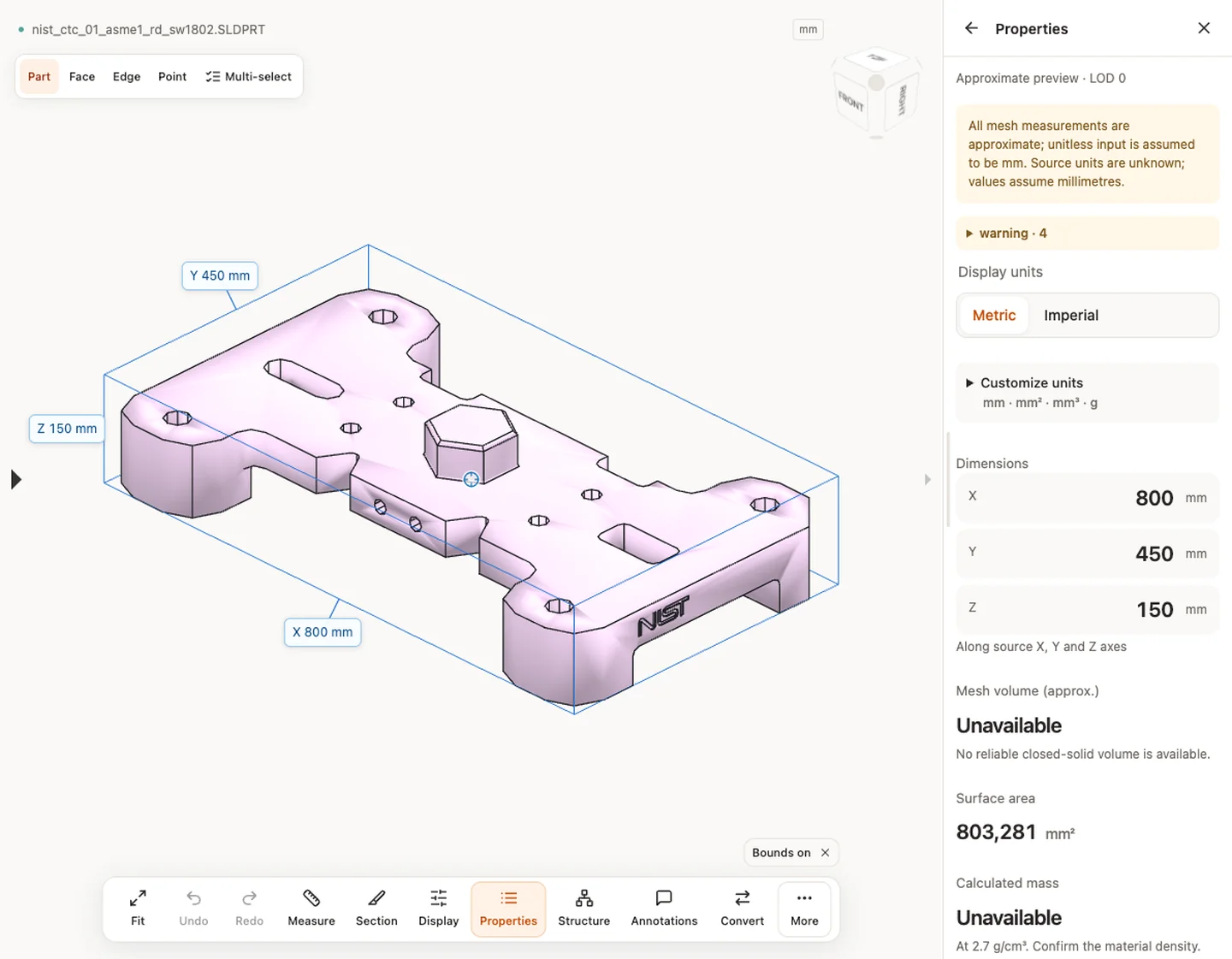
Sample source and verification
When a result needs another check
Viewing can start without an account. Conversion, account storage and share creation require signing in. Temporary files expire after the displayed retention period. Read the privacy statement for server processing and deletion, and the accuracy notes before using numerical results. Do not assume that hiding a part, clipping it or exploding an assembly changes the exported source geometry.
When a result needs another check · Input formats
Continue with a related task
- SolidWorks to STEP Converter: SLDPRT & SLDASM
- STEP File Dimensions Online: Measure X, Y, Z & Distances
- Compare CAD Files Online: STEP Geometry & Properties
Original article: CADProps · https://www.cadprops.com/tools/solidworks-viewer/
