

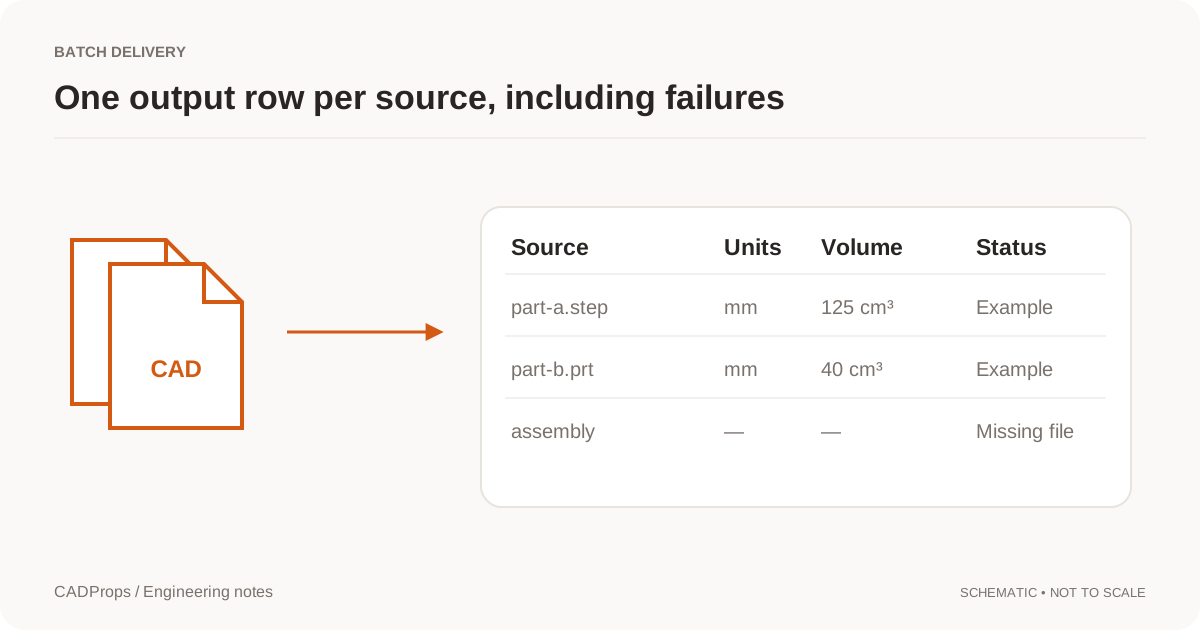
A batch report is only useful if someone can understand a row without reopening every model. A list of filenames and unlabelled numbers does not meet that test. Decide what each row represents and what the numbers mean before running a folder of CAD files through a processor.
For a first batch, use a small, mixed set. Include a valid part, an assembly with a repeated component, a file with no material assignment and one input that should fail. That set tests the reporting behavior, not only the happy path.
Define the row: file, unique part or assembly instance
One row per file is straightforward for a directory of independent parts. It is not the same as a bill of materials. One part definition may appear several times in an assembly, and a file may contain multiple bodies or configurations.
Choose the reporting scope explicitly. For an assembly quantity report, preserve the relationship between definitions and instances. For a file-processing audit, keep one row for every submitted input, including failures.
NIST's STEP analyzer can produce spreadsheets from entity and attribute information, but that kind of file-structure report is not automatically the same as a purchasing BOM or the property table described here. NIST analyzer overview.
Use column names that carry the meaning
| Column | Example | Reason to keep it |
|---|---|---|
| source_file | housing.sldprt | Links the row to the input |
| source_revision | Rev.B | Prevents version ambiguity |
| scope | selected body / full resolved assembly | Says what was measured |
| length_mm | 120 | Unit is explicit |
| volume_mm3 | 125000 | Avoids a hidden cubic-unit conversion |
| density_g_cm3 | 2.70 | Exposes an assumed material input |
| estimated_mass_g | 337.5 | Distinguishes an estimate from a saved field |
| status | calculated / incomplete / failed | Stops blanks from being misread |
| note | missing component reference | Makes exceptions actionable |
The numerical values above are an arithmetic example, not measurements extracted from the demo image.
Keep imported and calculated properties separate
If the source file has a saved mass field, use an imported_mass column with its stated unit and source. A fresh geometry-based estimate belongs in another column. Do not silently overwrite one with the other.
Apply the same rule to materials, part numbers and configurations. A file can carry an attribute without that attribute being the authority for the next process. When the value is absent, leave it absent; do not guess a material or infer a part number from a convenient substring.
For volume-based calculations, validate the geometry conditions before producing a value. Open CASCADE property documentation explains why a routine's return value alone is not sufficient evidence of valid input.
Keep failures in the table
A batch of twenty inputs should not turn into nineteen rows with no explanation. Include the rejected input and the reason. Distinguish unsupported format versions, missing references, invalid geometry and a task timeout.
Do not place zero in every failed numeric cell. Zero is a possible numerical result, not a general error code. Leave the value blank and use a status column.
For partial assemblies, state that the result covers only loaded components, or withhold the aggregate result if the report could be mistaken for a complete total.
Make the spreadsheet safe to open
Treat filenames and imported metadata as untrusted text. CSV quoting prevents delimiter problems, but quoting alone is not a complete safeguard against spreadsheet formula interpretation. A production exporter should deliberately handle values that spreadsheet software may interpret as formulas.
Use consistent decimal and unit conventions, and document them. Keep raw numerical cells numeric rather than embedding “mm” in every value. Put units in headers or separate fields so the recipient can sort and calculate without cleaning the sheet.
CADProps processes self-contained STEP/IGES geometry, supported static meshes and bounded ZIP packages. STEP pairs support solid differences; other 3D inputs support visual comparison. SolidWorks, Siemens NX / UG NX PRT and Inventor IPT/IAM support validated STEP conversion and viewing of the converted geometry. Package assembly references in ZIP; partial geometry is flagged. DWG and DXF use the separate 2D viewer for bounded preview and basic measurement. Open the STEP workspace or open the DWG viewer.
Send a manifest with converted files
When the batch also creates STEP or other output files, include a source-to-output manifest. Two inputs with the same basename must not overwrite one another. Record the output state per task and identify retries without charging or counting them as new design revisions.
Before sending the package, open one output from each source format and inspect the exceptions. Automation saves repeated work; it does not remove the need to understand what was included.
Reconcile row count and calculation status before using totals
For twenty submitted inputs, check that twenty input outcomes are represented, including failures. Sum volumes only for a comparable, valid scope and retain incomplete or unavailable rows as exceptions. Do not convert blank numeric cells to zero to make spreadsheet totals convenient.
Test one open-surface input and one repeated-instance assembly along with a closed part. The open-surface case should retain unavailable volume, while the assembly case distinguishes summed instance material from the outer envelope. The tables in this article describe a reporting design; they are not a claim that every proposed custom column already exists in the current CSV exporter.
Original article: CADProps · https://www.cadprops.com/guides/batch-cad-properties-to-excel/