


An Autodesk Inventor part normally uses the IPT extension. If you only need to inspect geometry, check dimensions or create a neutral handoff, you do not necessarily need the full Inventor authoring environment.
Open the matching tool. Viewing is available without an account; sign in when the conversion workflow requires it.
Read the version warning before retrying
Upload the original IPT in the Inventor viewer, wait for readable geometry, and check Properties and warnings. Record the Inventor release that saved the file; a future or unsupported release can fail even when the file is intact. Renaming does not make it compatible. Ask the sender for a fresh self-contained STEP export when the native reader rejects the file. An IAM requires its referenced parts in a ZIP; do not treat an IPT workflow as proof of a complete assembly.
Open the file in the IPT viewer, verify the part, then decide whether you need to keep working with the native file or convert it to STEP.
Open the original IPT, not a renamed copy
Keep the source attachment unchanged. Renaming an IPT to STEP, STP or another extension does not translate the model.
Upload the IPT and check the expected part shape, body count, orientation, overall dimensions and any warnings or unsupported-data messages.
If you know one dimension from a drawing, use it as the scale check.
IPT is a part; IAM is an assembly
Inventor uses IPT for parts and IAM for assemblies.
An IAM can reference multiple IPT files and nested IAM assemblies. If you received an IAM without its dependencies, the assembly may be incomplete even when the top-level file itself is valid.
For an assembly workflow, collect the root IAM and referenced files in a ZIP while preserving relative paths. The IAM without Inventor guide explains this packaging in more detail.
A partial assembly can still answer some visual questions, but do not treat its dimensions, volume or mass as complete assembly totals.
Verify units before calculating properties
Do not infer scale from the size of the model on screen. Fit-to-view automatically adjusts the camera.
Check a known linear dimension. Once the scale is confirmed, inspect the geometry properties relevant to the task.
For a valid closed solid, volume can support a mass estimate when you supply the intended material density. That is a new calculation; it should not be confused with a material definition that may have existed in Inventor.
What can you check without Inventor?
A neutral inspection workflow can be enough for overall size, orientation, obvious holes and pockets, component presence, surface area, valid solid volume, density-based mass scenarios and conversion to STEP.
It is not a replacement for editing Inventor sketches, constraints, parameters or feature history.
If the task is a design change, ask for access to the authoring workflow or the responsible CAD owner.
Convert IPT to STEP for cross-CAD use
If the next system cannot read IPT, use the Inventor-to-STEP conversion path.
Before conversion, identify the intended revision and scope. After conversion, verify one known dimension, expected bodies and a critical feature.
The STEP file is a derivative exchange artifact. It should remain traceable to the original IPT revision.
See the conversion checklist for a repeatable handoff process.
What if the IPT will not open?
Native CAD compatibility depends on the saved file version and supported reader.
If processing fails, confirm it is really an Inventor IPT, ask which Inventor release saved it, obtain a fresh copy if transfer corruption is possible, and ask the sender for a STEP export when neutral geometry is sufficient.
Do not repeatedly rename or route the file through random converters; that can create more derivatives without answering why the original failed.
Keep viewing and engineering approval separate
Being able to see the model does not establish the controlling revision, material, tolerance or manufacturing acceptance criteria.
For supplier review, keep the drawing or agreed specification alongside the model. Record which file and revision you actually inspected.
A practical IPT workflow
- Open the original IPT.
- Confirm the expected part.
- Verify units with a known dimension.
- Inspect the geometry relevant to the task.
- Use IAM packaging rules if the work is really an assembly.
- Convert to STEP only if the recipient needs it.
- Keep the native source with its revision context.
That gives you a useful inspection path without pretending a browser viewer is a full Inventor replacement.
A visible IPT preview with no volume is a real outcome
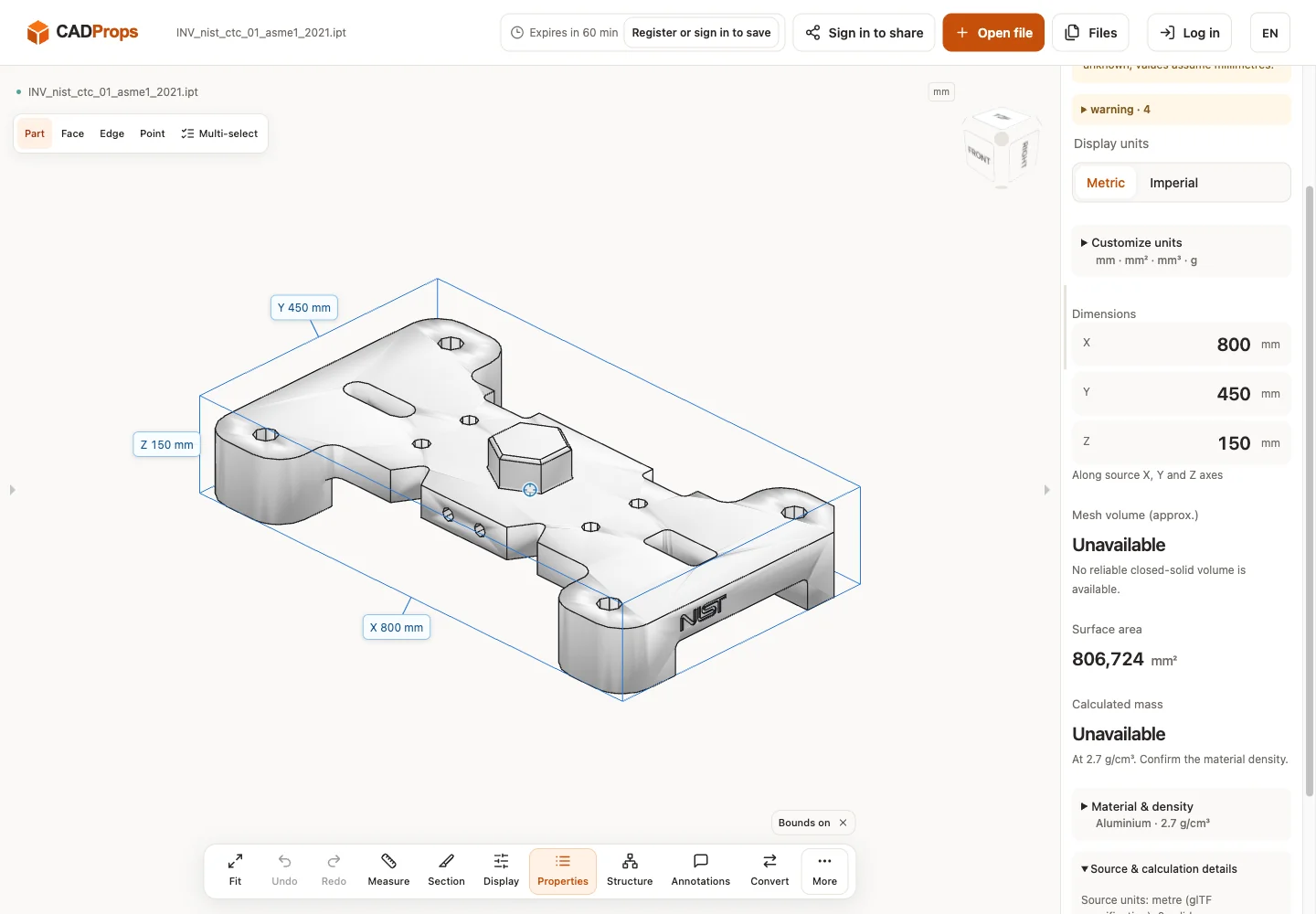
The public Inventor 2021 check below displayed the expected envelope but left volume unavailable. That is evidence of a readable preview, not of a usable solid volume or a failed zero-mass part. Keep the unavailable state in CSV and do not fill it with a bounding-box product.
The native viewing path may provide converted triangles. For that representation, dimensions and mesh properties are approximate; precise B-Rep edge/diameter measurements and Solid Differences are not available. Changing the material density cannot restore missing volume, and adding display decimals cannot restore analytic faces.
If your task needs solid properties or a downstream CAD import, obtain a readable STEP derivative and verify it separately. Ask the Inventor owner to export from the intended release/configuration if the conversion fails. For an IAM, also request its complete dependency package: opening one constituent IPT does not establish that the assembly is complete.
Actual public-file check
Reproduce: download the original model from the source link, open it in the matching viewer, wait for the canvas and inspect Properties and warnings. The screenshot is the actual English interface on 2026-10-01 at www.cadprops.com.
Public model source · Inventor 2021 · INV_nist_ctc_01_asme1_2021.ipt
| Observed X / Y / Z (mm) | Observed volume (mm³) |
|---|---|
| 800 × 450 × 150 | Unavailable |
These results are converted triangle previews. Dimensions, area and any mesh volume are approximate; source-unit interpretation must be checked against a known physical length. B-Rep edge/diameter measurement and Solid Differences are unavailable for this result. This single-file check does not establish support for every version or geometry.
SHA-256: c3716769b86d5fb7db9b65fa4c785c0f98db92258af0a801d544ab7d83251ec3
Open the matching tool. Viewing is available without an account; sign in when the conversion workflow requires it.
A STEP export from Inventor can also be checked in the online STEP viewer when the native IPT will not load.
Original article: CADProps · https://www.cadprops.com/guides/open-ipt-without-inventor/