


A CATPart file contains a CATIA part. If you need to inspect the shape, check dimensions or send neutral geometry to another CAD system, you may not need the complete CATIA authoring environment.
Upload the .CATPart file to CADProps and it opens in the browser without CATIA. A part shows the display geometry CATIA saved, with approximate properties, unless its B-Rep is rebuilt completely and matches that display; then it gives exact properties and an exact STEP. A CATProduct shows only its saved thumbnail.
Open the matching tool. Viewing is available without an account; sign in when the conversion workflow requires it.
Check CATPart and CATProduct separately
Upload CATPart for a part. A CATProduct shows only the thumbnail saved in it; see the CATProduct guide below. Wait for the canvas, then check Properties, body count and warnings. Incomplete geometry describes only loaded parts. Support covers validated CATIA V5 part/assembly paths, not every release or CATShape, CGR or V4 MODEL/SESSION. Read-back failures are rejected; request STEP from the sender when needed.
Open the file in the CATPart viewer, confirm that the expected geometry loaded, verify scale, then convert to STEP only when the next workflow requires it.
Choose the file for the receiving task
| What the recipient needs | Start with | Check before handoff |
|---|---|---|
| Review one part's shape or overall size | Original CATPart | Expected bodies, one known dimension and any reader warnings |
| Review a product assembly | A STEP export of the whole assembly from CATIA | Component scope, placements and one known dimension |
| Edit sketches, constraints or design features | Native CATIA source in a compatible authoring workflow | Application version and required dependencies |
| Import neutral geometry into another CAD system | A STEP derivative made from the readable source | Units, body count and a critical feature in the receiving system |
The same shaded preview cannot prove that all four jobs are complete. Record which source and derivative were checked rather than treating a successful upload as an approved handoff.
Keep the CATPart unchanged
Do not rename a CATPart to STEP or another CAD extension. A file extension is a label, not a converter.
Upload the original file and inspect expected bodies, orientation, overall dimensions, critical holes or pockets and any warnings about unreadable or unsupported geometry.
Keep a copy of the source attachment so every later comparison uses the same input.
Check the CATIA version when compatibility is uncertain
Native CAD readers are version-sensitive. A service can support CATIA V5 generally while still failing on a particular saved release or data variant.
If an ordinary-looking CATPart is rejected, ask the sender which CATIA version created or last saved it.
Do not assume the file is corrupt simply because one reader cannot open it.
When the receiver only needs geometry, a fresh STEP export from the source application may be the cleanest workaround.
Verify the model scale
A browser view can make a tiny component and a huge component occupy the same screen.
Use a known dimension from the drawing or sender. Confirm the unit before using surface area, volume or mass.
If the dimensions are implausible, resolve the source or import unit interpretation rather than resizing by eye.
For example, if the drawing identifies an 80 mm flange width, record the expected value, the corresponding model measurement and its unit. A matching overall width checks scale; it does not establish that every hole position or tolerance matches the drawing.
CATPart and CATProduct are different jobs
CATPart is a part. CATProduct represents an assembly or product structure and can depend on referenced CATPart files.
If you receive a CATProduct, CADProps shows only its saved thumbnail. Ask for a STEP export of the assembly, or upload the CATPart files individually.
The CATProduct without CATIA guide explains both routes.
When components are missing, keep the result marked incomplete. Do not present the loaded subset as the full assembly.
What can you inspect without CATIA?
A viewer can be useful for visual inspection, overall dimensions, supported geometry measurements, body or component scope, surface area, valid solid volume, density-based mass scenarios and STEP conversion.
It does not recreate CATIA sketches, constraints, design features or native editability.
If the task depends on design intent or parametric edits, use the authoring workflow instead.
Convert CATPart to STEP for neutral exchange
When the next CAD or CAM system does not read CATPart, use the supported CATIA-to-STEP path. You get an exact STEP when the part's B-Rep is reconstructed completely and matches the saved display; otherwise a mesh STEP built from the display triangles.
After conversion, check units, one known dimension, expected bodies, a critical curved or machined feature and the result in the receiving system when practical.
STEP is an exchange derivative, not a replacement for the original CATPart when future native editing matters.
The feature-tree guide explains this boundary.
If the CATPart does not open
Use a structured diagnosis: confirm the file is CATIA V5 CATPart, confirm source release, obtain a fresh copy, ask for STEP if neutral geometry is acceptable, and check whether the actual task is an assembly that needs a STEP export of the CATProduct.
That produces a better answer than simply calling the file broken.
A practical CATPart workflow
- Open the original CATPart.
- Confirm expected geometry.
- Verify one dimension and unit.
- Inspect only the properties needed for the task.
- Keep assembly workflows separate from standalone parts.
- Convert to STEP only when required.
- Preserve the native source and revision context.
The useful outcome is not merely seeing a CATIA model. It is knowing exactly which geometry and scale you reviewed.
Keep preview evidence separate from CATIA compatibility
The NIST CATPart below supplies a reproducible check for one CATIA V5-6R2019 file. It establishes that file's observed viewing outcome. It does not certify every file saved by that release, every CATIA data variant or the completeness of a related CATProduct.
Read the imported representation before using measurements. A converted triangle preview can show the part and support approximate mesh properties while not providing analytic B-Rep selections. The volume shown in the record is therefore labeled with its method; it is not an assertion that the native CATIA mass property transferred unchanged.
If a supplier requires STEP, create the supported derivative and reopen it independently. Compare body scope, one known size and a task-critical interface. If reading or writing fails, request an export from the authoring system and retain the actual failure. A CATPart screenshot cannot serve as proof of a CATProduct assembly transfer or recovered CATIA history.
Actual public-file check
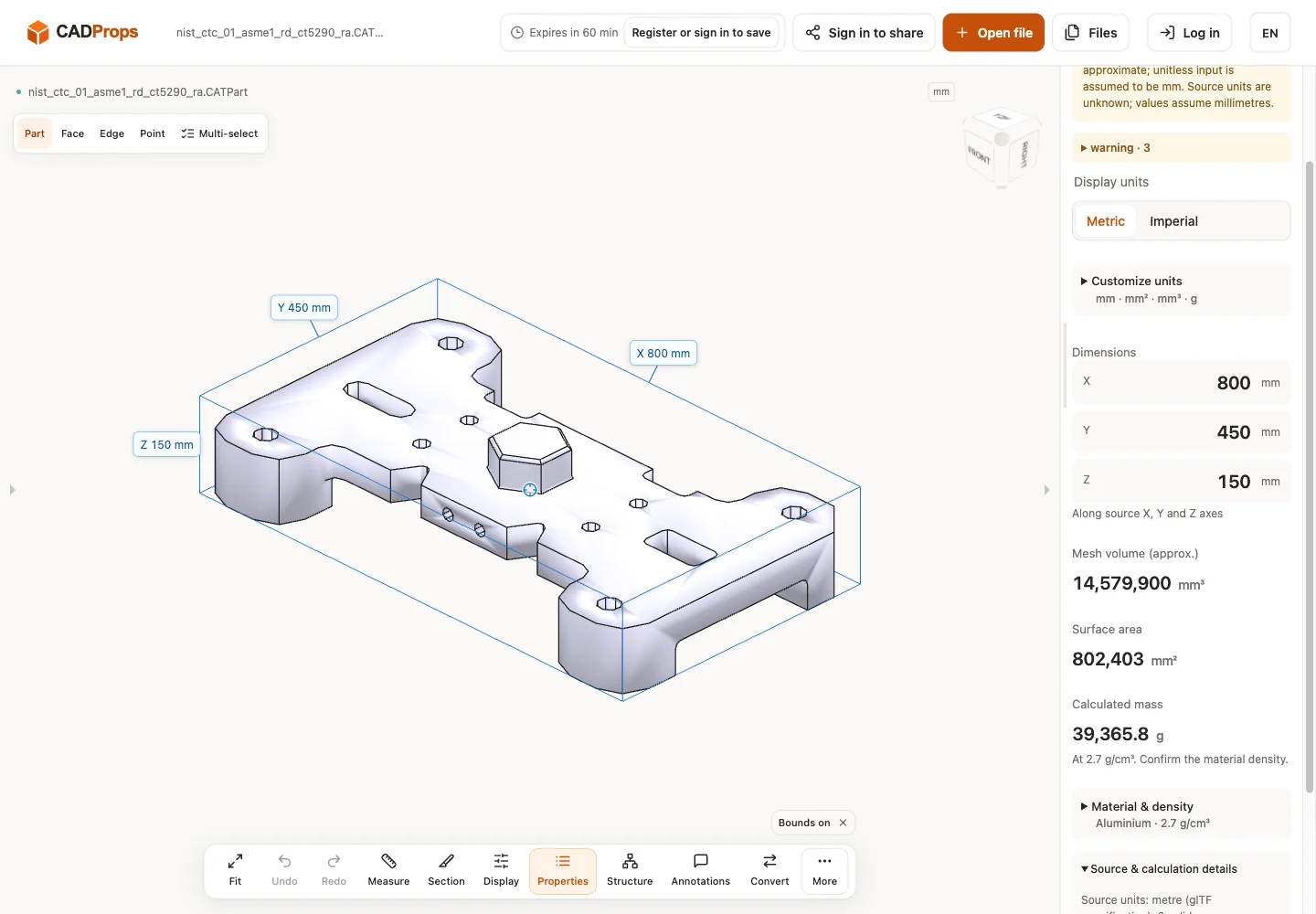
Reproduce: download the original model from the source link, open it in the matching viewer, wait for the canvas and inspect Properties and warnings. The screenshot is the actual English interface on 2026-10-01 at www.cadprops.com.
Public model source · CATIA V5-6R2019 · nist_ctc_01_asme1_rd_ct5290_ra.CATPart
| Observed X / Y / Z (mm) | Observed volume (mm³) |
|---|---|
| 800 × 450 × 150 | 14579938 |
These results are converted triangle previews. Dimensions, area and any mesh volume are approximate; source-unit interpretation must be checked against a known physical length. B-Rep edge/diameter measurement and Solid Differences are unavailable for this result. This single-file check does not establish support for every version or geometry.
SHA-256: 3f19cc5350b8ca45ade6035d16ab4e1362243ac7e614a1dd9d658efd85a19e00
Open the matching tool. Viewing is available without an account; sign in when the conversion workflow requires it.
Supported 3DXML exports with XML or CATIA V5 binary (UVR) .3DRep tessellations open in the 3DXML viewer, with package-local product references and placed meshes. Units are unverified and assumed millimetres; other binary representations, textures and exact B-Rep are unsupported. Mesh exports do not provide exact CATIA-to-STEP conversion.
When a CATIA part does not load, a STEP export opens in the STEP file viewer without CATIA.
Original article: CADProps · https://www.cadprops.com/guides/open-catpart-without-catia/