


You can inspect many Siemens NX or UG NX PRT files without installing the full NX authoring environment. The important first step is to confirm that the file really is an NX PRT, because PRT is not a unique extension.
Open the matching tool. Viewing is available without an account; sign in when the conversion workflow requires it.
Identify the reader before checking properties
Confirm with the sender that PRT was saved by Siemens NX or UG NX, not Creo. Record the saving release. Upload the original part; for assemblies, preserve the root and referenced PRT files in ZIP. Wait for the model, then check Properties, known dimensions and warnings. A failed reader or incomplete assembly needs a compatible export or complete references; renaming cannot repair either.
Open the file in the NX PRT viewer, verify the geometry and scale, then convert to STEP only if the next workflow needs a neutral file.
First confirm that PRT means Siemens NX
Both Siemens NX and other CAD systems can use a PRT extension. A filename alone is therefore not enough to select the right reader.
When the source is unclear, ask the sender which CAD application created the file, which release saved it, whether it is a standalone part or part of an assembly, and whether referenced components belong with it.
The NX-or-Creo PRT guide covers this ambiguity in more detail.
Do not rename an unknown PRT to STEP or another extension. That changes only the name.
Open a standalone NX part
For a standalone NX PRT:
- Upload the original file.
- Let the viewer process the readable native geometry.
- Fit and rotate the result.
- Check overall dimensions.
- Compare one dimension with the drawing or sender's value.
- Inspect body count and any warnings.
This sequence catches two common handoff problems early: wrong source identity and wrong physical scale.
NX assemblies need their component references
An assembly is different from a standalone part. The top-level file may depend on other local PRT files.
Package the assembly and references in a ZIP while preserving their relative folder structure. If the system asks which item is the root, choose the intended top-level assembly.
When components are missing, partial geometry can still be useful for visual inspection, but the result must stay clearly marked incomplete. Overall dimensions, surface area, volume and mass then describe only what loaded.
Do not present a partial total as a complete assembly property.
Verify units before using measurements
A viewer can fit any model to the screen. Visual size is not a unit check.
Compare a known dimension. If a mounting plate expected to be roughly 150 mm appears as several metres, resolve the unit interpretation before conversion or quoting.
For local geometry, use the supported measurement mode rather than estimating from pixels. Keep manufacturing tolerances tied to the drawing or model-based definition; a viewer measures the current shape, not the permitted variation.
When should you convert NX PRT to STEP?
If the receiving system does not read NX natively, STEP is often a practical neutral handoff.
Use the NX PRT to STEP converter after the source model passes the basic checks.
A part gives an exact STEP when a Parasolid partition saved in the PRT rebuilds into closed, valid solids that agree with the saved display; many NX parts do not qualify yet. Otherwise the export is a mesh STEP built from the display geometry NX saved, not exact NX surfaces. When the receiving CAD or CAM system needs a solid and the result is a mesh, ask for a STEP export from NX.
Then compare known dimensions, body or component count, placements, a small hole or pocket and one important mating surface.
For a production handoff, reopen the STEP in the receiving CAD or CAM system where possible. A conversion-complete message is not the same as confirming downstream usability.
The NX-to-STEP guide gives a fuller conversion checklist.
What STEP will not preserve
A neutral STEP output does not recreate the original NX feature tree, sketches, expressions and parametric design history.
If future editing depends on those features, keep the native NX source with the STEP derivative.
A good package identifies the source revision and the derivative clearly so nobody mistakes the converted file for a new design revision.
What if the NX file does not open?
Before assuming corruption, check whether the source application is really NX, whether the source release is supported, whether the upload is complete, whether assembly references are present and whether the file is only a preview derivative.
If the sender has NX, asking for a fresh STEP export from the intended released configuration can be faster than trying multiple unknown converters.
A useful no-NX workflow
For inspection without NX:
- Confirm the PRT source.
- Open the native file in the viewer.
- Verify model scope and units.
- Check a known dimension.
- Inspect the geometry required for the task.
- Convert to STEP only if needed.
- Verify the STEP result in the receiving workflow.
That workflow gives you much more confidence than simply finding an application that can render a PRT thumbnail.
A PRT identity check is different from a support check
Confirming that PRT came from NX selects the intended workflow; it does not establish that the reader supports that particular source release and geometry. Two files saved by the same NX release can still behave differently, so record the result for each file you test.
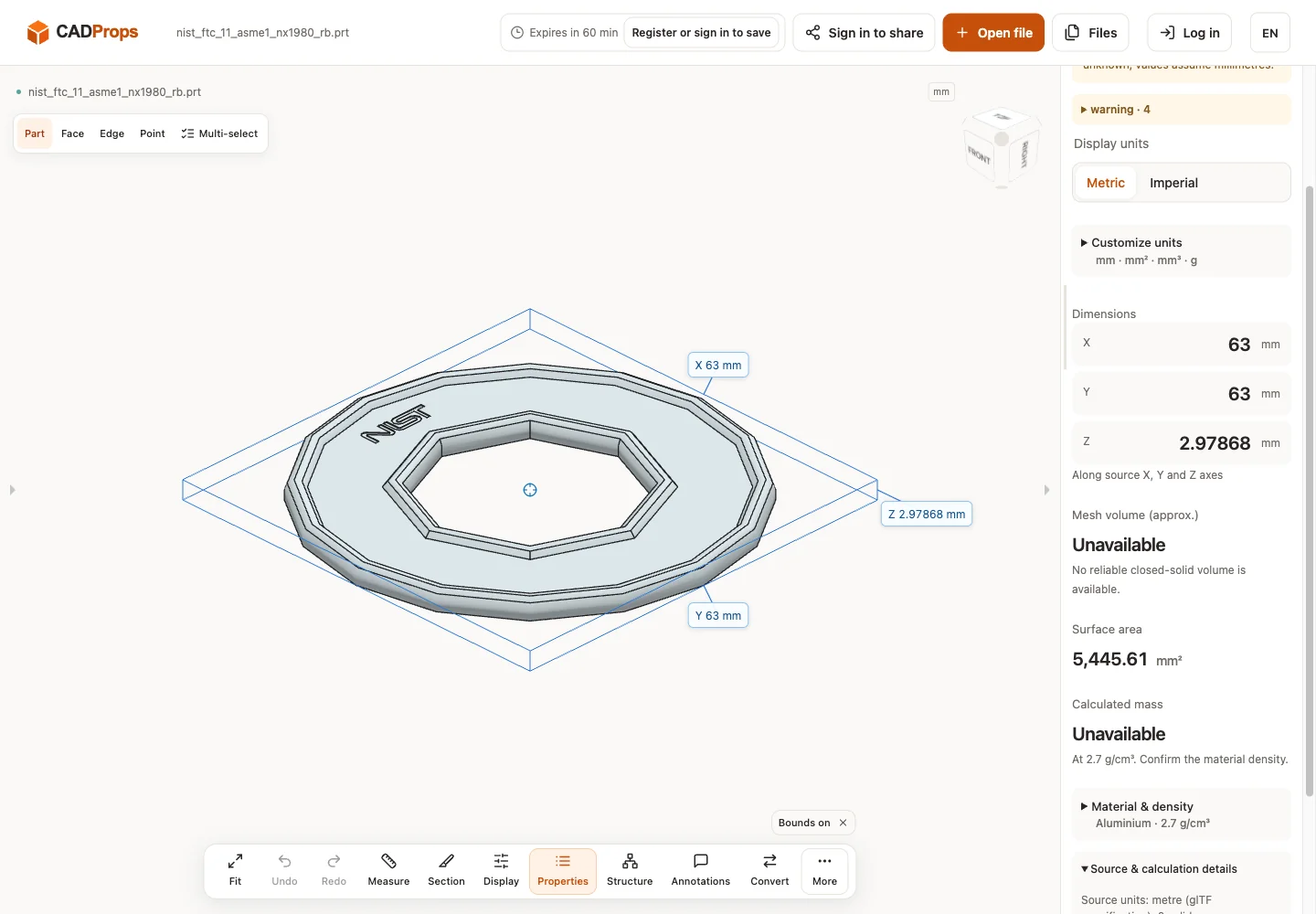
The readable example below had unavailable volume. Its converted triangle preview can answer limited shape and overall-size questions, but it does not expose analytic B-Rep edge/diameter measurement or Solid Differences. An unavailable volume remains unavailable when you change display units or density.
When precise neutral geometry is needed, use a separately verified STEP derivative or request a fresh STEP from the NX owner. Ask for the released configuration and complete references for an assembly. If the sender instead confirms Creo, follow the Creo export route; renaming the PRT cannot turn it into an NX model.
Actual public-file check
Reproduce: download the original model from the source link, open it in the matching viewer, wait for the canvas and inspect Properties and warnings. The screenshot is the actual English interface on 2026-10-01 at www.cadprops.com.
Public model source · NX 1980 · nist_ftc_11_asme1_nx1980_rb.prt
| Observed X / Y / Z (mm) | Observed volume (mm³) |
|---|---|
| 63 × 63 × 2.97868 | Unavailable |
These results are converted triangle previews. Dimensions, area and any mesh volume are approximate; source-unit interpretation must be checked against a known physical length. B-Rep edge/diameter measurement and Solid Differences are unavailable for this result. This single-file check does not establish support for every version or geometry.
SHA-256: 9a7345416745ef4f355b1ddc75183ef75a9a0763c94b7b770173c60c99a8df1e
Open the matching tool. Viewing is available without an account; sign in when the conversion workflow requires it.
Original article: CADProps · https://www.cadprops.com/guides/open-nx-prt-without-nx/