

Open the part in the CADProps dimensions tool. Choose Measure → Exact wall thickness and click well inside the pocket floor. CADProps measures inward along the normal to the picked CAD face, stopping at the first exit of the same solid. You can check the material under the floor while viewing the part from above.
Check the floor and rim separately
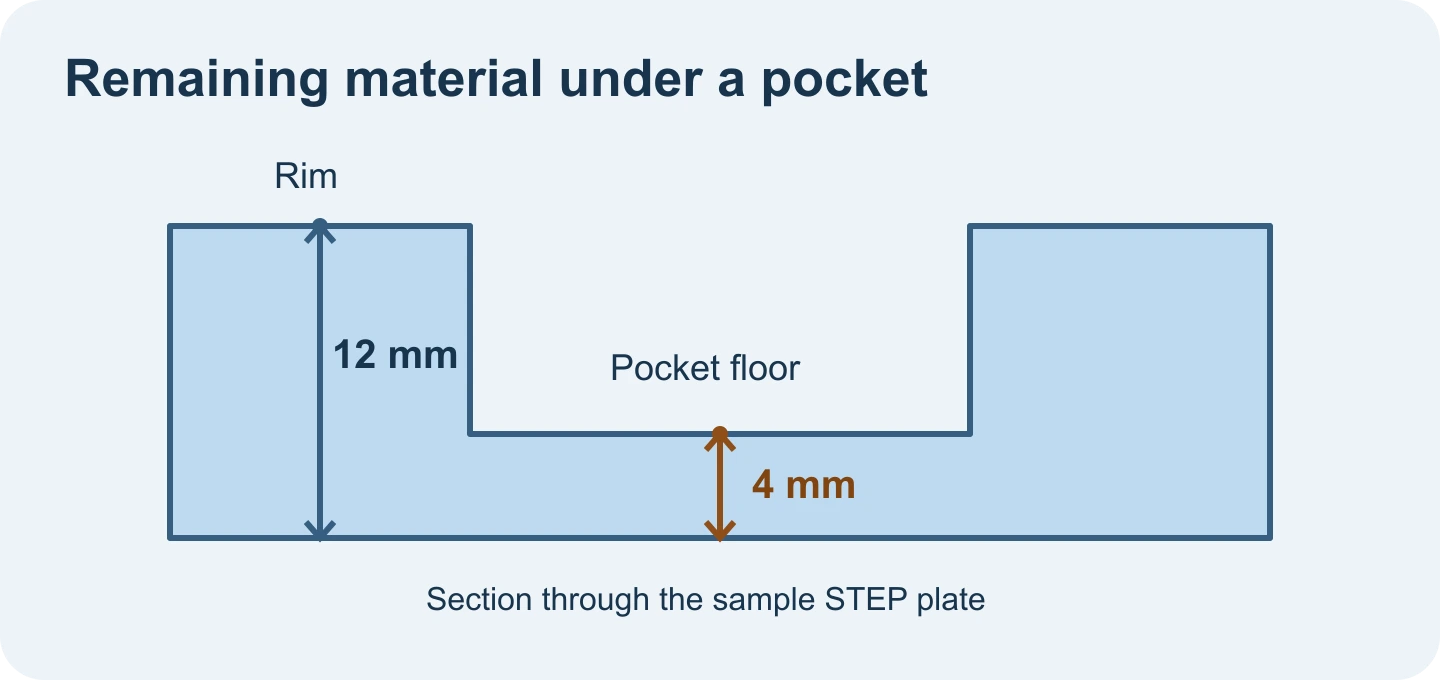
- Open the pocket plate sample and use millimetres. The plate is 12 mm high with an 8 mm deep pocket.
- Click near the middle of the lower floor with Exact wall thickness active. The result is 4 mm, from the pocket floor down to the underside.
- Click the broad top rim, away from the pocket edge. It reads 12 mm because that part of the solid extends from the top to the underside.
When the pick has no clear exit
Move the pick away from the pocket edge, a corner or a blend. A boundary can make the first exit ambiguous. If Exact wall thickness is missing, check that you are in the workspace with a complete STEP solid and that the model has readable CAD faces. Open shells and display meshes cannot supply this exact solid measurement.
This is a local reading. Repeat it at other locations if the floor slopes or the underside varies. For a machining review, compare those readings with the tolerances in the drawing and the supplier's wall-thickness requirements.
Original article: CADProps · https://www.cadprops.com/guides/measure-step-pocket-floor-thickness/