


Start with the original .x_b file in the CADProps Parasolid viewer. CADProps reads binary Parasolid directly. If the upload is rejected or the model opens with warnings, note which stage failed before asking the sender for another export.
Open the original binary file in CADProps
- Open the viewer and select the original
.x_bfile. CADProps also accepts the binary alias.xmt_bin. - Wait for the model and check any warnings. If you can see the shape, open Properties and compare X, Y and Z with a known dimension.
- Check the source solid count. For an assembly, compare the parts you expected with what the viewer loaded. A model can be visible even when the source does not contain a closed solid.
| What you see | What to check next |
|---|---|
| The file is empty or much smaller than the sender's copy | Download or transfer it again and compare the file sizes. |
| CADProps cannot read the original file | Ask the sender whether it reopens in their CAD application. Request the export version and save the error message. |
| The original opens in CADProps but fails in the receiving CAD system | Check whether that system supports binary Parasolid and the version used. Ask for a compatible export if needed. |
| The shape opens, but a component or solid is missing | Check the viewer warning and ask the sender to confirm the export scope and assembly settings. |
Renaming .x_b to .x_t leaves the contents in binary. If the receiving system only supports text Parasolid, ask for a real X_T export at a compatible version. SOLIDWORKS Parasolid export documentation
Export a small test before sending the assembly
Suppose a shop needs a fixture assembly and wants to identify the baseplate and clamps separately. Use one representative subassembly to test the import. In SOLIDWORKS, select Parasolid or Parasolid Binary in Save As, then open Options to set the recipient's supported version. Review the assembly hierarchy and output coordinate system there. If the receiver needs the hierarchy, leave flattening disabled and check what its importer actually preserves.
Ask the recipient to reopen that export in the system they will use for the job. Compare component names and count, the orientation, and a dimension from the drawing. If it opens at the right size but the clamps arrive in the wrong positions or the assembly is flattened, correct the export and retest the same sample. Changing from text to binary will not fix an export setting.
Verify that the imported geometry suits the job
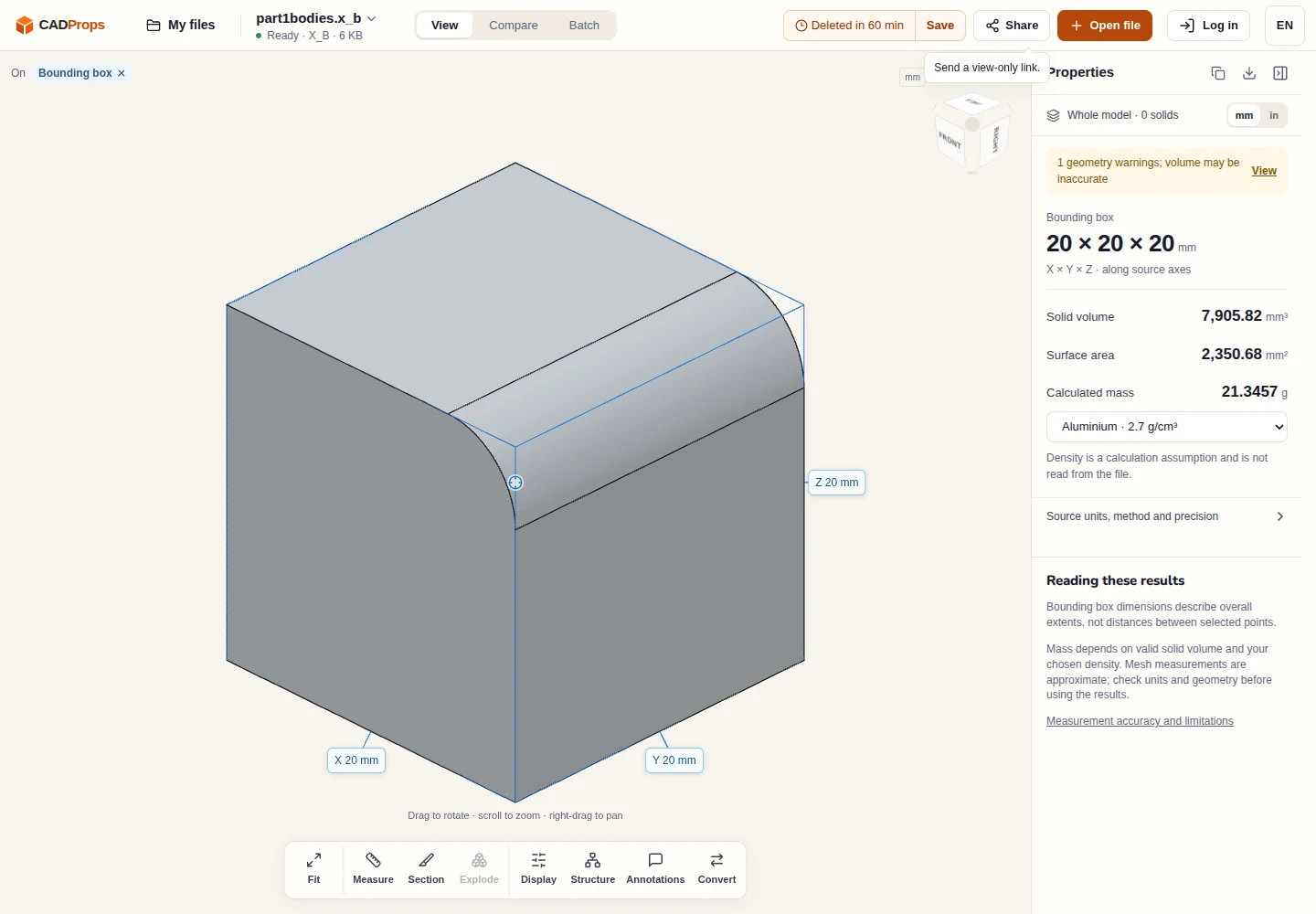
The CADProps Parasolid viewer reads both encodings. Open the original file, compare a known dimension and inspect the warnings and source solid count. The binary sample below has the expected 20 mm extents but zero source solids. It is a useful preview, but its recovered volume is approximate. Ask for a closed solid if you need solid volume or a downstream solid model.
For a repeat order, include the revision, the agreed Parasolid version and encoding, and whether the file preserves the assembly hierarchy. That gives the next recipient enough information to reproduce the import.
Original article: CADProps · https://www.cadprops.com/guides/parasolid-x-b-file-not-opening/